
How to reply to app store reviews: what to write on iOS and Google Play (2026)
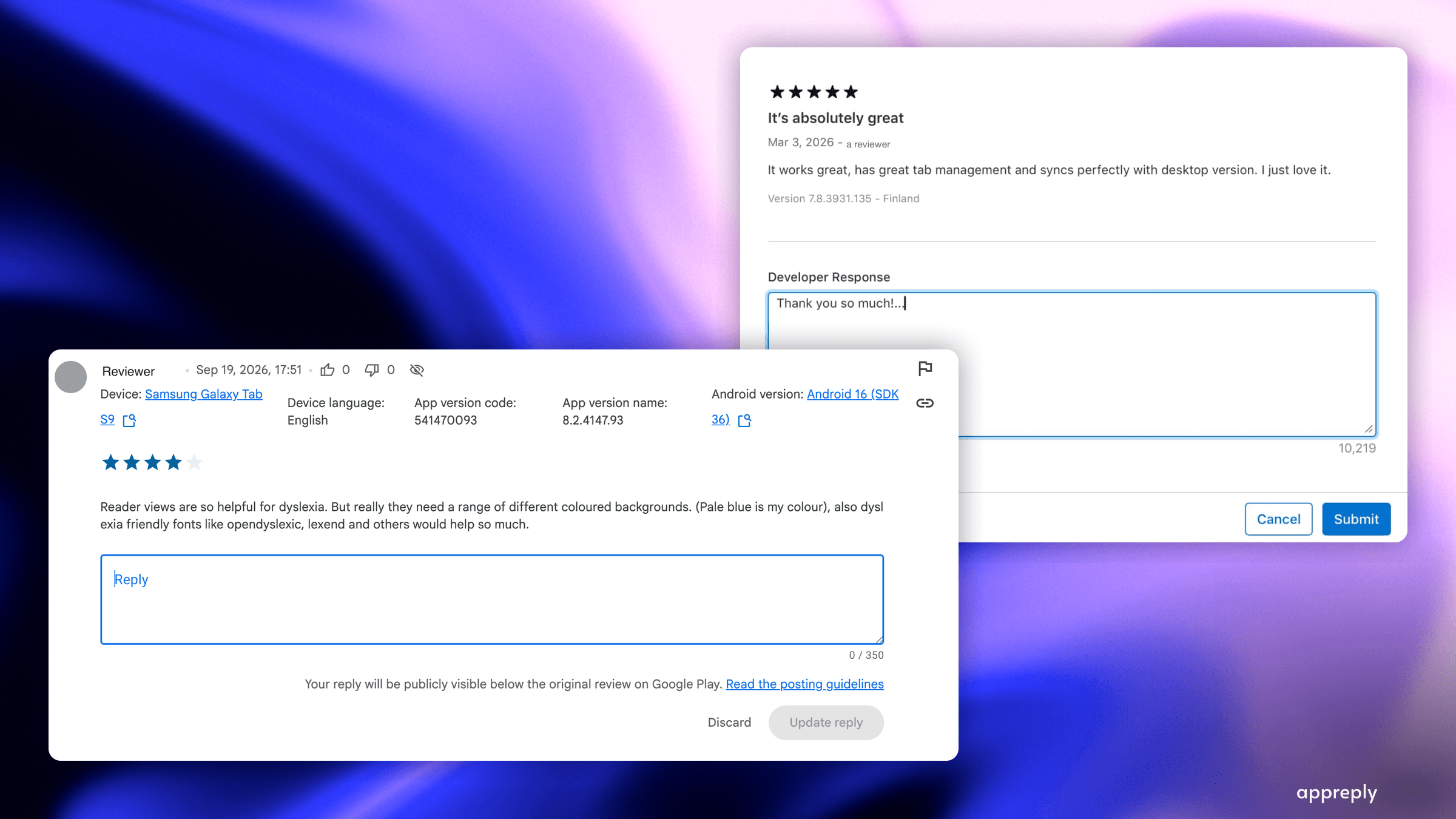
A developer reply is public writing with your company's name on it. A third-party write-up says Google's app quality audit checks whether replies are templated or personal, which is one reported audit, not a published Google policy. This guide covers how to reply on the App Store and on Google Play, who needs which permission, what the 350 character limit and the 24 hour delay change about your writing, how to answer eight kinds of review with examples, when a reply can ask for a better rating, and how to keep quality up once you are past a few hundred replies a month. The backdrop is our 2026 study of 100 top Google Play apps on US charts, where 8 in 9 low-star reviews got no reply at all and 42% of the replies that did go out were word-for-word repeats.
To reply (respond) to an app store review, click Reply next to the review under Ratings and Reviews in App Store Connect, or use the Reply field in Play Console. An App Store reply can take up to 24 hours to appear. Google Play replies are limited to 350 characters.
Key takeaways
- A developer reply is public writing, not a support ticket. Everyone deciding whether to install reads it, and both stores now summarise review text with AI.
- The mechanics differ enough to change your writing. 350 characters and no stated delay on Google Play. Up to 24 hours on the App Store, where about 5,970 characters is what developers report; Apple does not publish a limit.
- The reviewer is notified when you reply. Apple and Google both say so, and Google says editing your reply does not notify them again. That notification is what gives them a reason to update the review, so get the reply right before you submit it.
- Most low-star reviews get no reply. In our 2026 study of 100 top Google Play apps on US charts, 8 in 9 low-star reviews had no reply a week later.
- In those 100 top Google Play apps on US charts, 42% of replies were word-for-word repeats, and about 1 in 4 graded replies to low-star reviews missed what the reviewer raised, by an AI grade that a person disagreed with on 1 reply in 10.
- One test beats every template. If your reply could be pasted under a different review without changing, it is not a reply.
- Ask for a better rating only when the review is clearly happy, never under a complaint.
- Past a few hundred replies a month, write the standard down and let it check every reply, instead of reading each one.
A reply used to be customer service. In September 2026, a third-party write-up of Google's app quality audit described a score that reads an app's reviews, and one of the things it reportedly weighs is whether the replies are templated or personal. The app in its case study answered 100% of its reviews with templates, and its reviews score was Medium. This is one reported audit, not a published Google policy.
So picture the reviewer who writes that your app crashed and cost them an afternoon. What you type back sits under their words for as long as the review is there, with your company's name on it, read by everyone deciding whether to install and, if the reported audit is right, by the store itself.
Most teams never get that far. In our 2026 study of 100 top Google Play apps on US charts, about 8 low-star reviews in 9 got no answer at all.
This guide starts with what to write, because that is the part every reader judges, the part the reported audit says Google weighs, and the part most teams get wrong. Then where the button lives in each console, how the two differ, and what to do when the volume passes what a person can read.
Most replies are templates, and the stores can tell
Before the how-to, the bar, with one caveat about the heading: that the stores can tell comes from one reported audit, not a published Google policy. The template half is what we measured. We read 848,200 reviews across 100 top Google Play apps on US charts and graded 1,830 developer replies. Three findings shape everything below.
Coverage is the first problem. Of 89,330 low-star reviews with real text, 11.5% had a reply a week later. Apps split hard: of the 76 we could judge, 24 answered none and 18 answered nine in ten or more. Replying is a decision somebody makes once, not a skill teams slowly acquire.
Speed is not the problem. When a reply came, the median wait was 6.8 hours and 61% arrived within a day. Any team that decides to answer is fast enough.
 When developers answer at all, they answer quickly. Almost half of replies land within six hours.
Quality is the second problem. 42% of all replies repeated another reply from the same app word for word, and one travel app posted the same sentence 1,604 times in 23 days. Among graded replies to low-star reviews, 73.8% answered what the reviewer raised, which leaves about 1 in 4 that did not. That is an AI grade, and a person disagreed with it on 1 reply in 10, so read the 73.8% as an upper bound.
 The angrier the review, the more often the reply misses what it was about.
Notice where the misses are. Praise is answered well because thanking someone is easy. One-star complaints, the reviews most people read, are where replies guess.
What to write: four moves and one test
Every reply that works does the same four things, in about the same order.
Name the problem in the reviewer's own words. Not a category, the actual thing. "Losing your export halfway through" beats "the issue you experienced". This is the part that proves someone read it, and it is the part templates cannot fake.
Say what is true about it. Fixed in a named version, being worked on now, or not something you are going to change. All three are fine. Inventing a fourth answer is not.
Give exactly one next step. Update to 5.1.2. Email support with your device model. Check this setting. One. A reply with three options is a reply nobody acts on.
Stop. Google Play caps a reply at 350 characters, which is about two or three sentences, and the App Store allows far more room than you need. No timeline promises, no roadmap commitments, no paragraph about your team's values. Every promise in a public reply is a liability the day plans change.
Then run the paste test: could this reply sit under a different review without changing a word? If yes, it is a template with extra steps. The reviewer can tell and, if the reported audit is right, so can the store.
 The same four moves on a real complaint, and the test that catches a template pretending to be a reply.
Two habits to drop. Blanket apologies read as boilerplate the moment someone scrolls three of your replies in a row, so acknowledge the impact factually instead. And never explain your internal process. "Escalated to engineering" tells the reviewer nothing they can use.
Replies by review type, with examples
For real replies to one to three star reviews, graded pass or fail with the reason, see how to respond to negative reviews.
Crash or bug report
App crashes every time I export my monthly report. Never happened before the last update. I run my business on these.
Weak: "Thanks for your feedback! Try reinstalling the app or clearing your cache."
Better, and inside 350 characters: "Thank you for flagging the export crashes, and sorry they hit your monthly reports. This came in with 5.1.1 and the fix is live in 5.1.2. Please update and try again. If it still fails, email support@example.com and we will take it from there."
Bug reports are the reviews worth answering first. They tell you what is costing you retention, and the reply is the only public evidence that you fixed it.
Billing or refund complaint
Charged again after I deleted the app. This is a scam.
Do not argue with the word scam, and do not accept blame for a store's billing flow. State how it works, then hand them the one path that resolves it: "Deleting the app does not cancel a subscription, it is managed by Google Play. Open Play Store, Subscriptions, and cancel it there. If it shows cancelled and you were still charged, email support@example.com with the order number and we will sort it out."
Route these to your helpdesk too, where an agent can look at the account. With Zendesk or Intercom connected, the review becomes a Zendesk ticket or an Intercom conversation, ticket status syncs back, and the reply is published from AppReply.
Feature request
Would be 5 stars if you could export to PDF.
Answer honestly about status without promising a date: "PDF export is the request we hear most and it is on our list, though I cannot give you a date yet. In the meantime, the share sheet will send a formatted copy to any app that accepts documents." One request is anecdote. Fifty are a roadmap signal, which is a job for review analytics rather than replies.
A 1-star review with no text
A rating with no words is the most common review you will see, and there is nothing in it to answer. Reply anyway, in one sentence, and ask a question: "Sorry to see the one star. What went wrong? Tell us here or at support@example.com and we will fix what we can."
In our 2026 study of 100 top Google Play apps on US charts, the most common way a reply missed the point was guessing at a problem nobody described. One question beats five troubleshooting steps.
An angry review
TERRIBLE. Paid for premium and half of it does not work. DO NOT BUY.
Do not match the tone, do not defend, do not say "sorry you feel that way". Acknowledge the substance and offer the exit: "Paying for premium and not getting it is not acceptable. Email support@example.com with which features are failing and we will fix them or refund you." You are writing for the next reader as much as for this one.
Praise
Best budget app I have tried. Widgets are great.
Keep it short and specific, and add one thing they might not know: "Glad the widgets are working for you. If you have not tried shared budgets yet, they use the same setup." Long replies to praise read as marketing.
A game review on patch day
Since the update I get kicked from every match and lost my 30 day streak. Bought the season pass yesterday, I want my money back.
Patch day is where reply quality collapses, because a hundred versions of this arrive at once and the temptation is one paragraph pasted a hundred times. The facts can be the same. The reply cannot: this player lost a streak and paid for a season pass yesterday.
"Getting kicked mid-match after an update is maddening, and losing the streak with it is worse. We are fixing disconnects on this version now, and picking the nearest server region usually helps meanwhile. For the season pass, you can request a refund from your order history in the Play Store."
Games answer their players far more than other apps do. In our 2026 study of 100 top Google Play apps on US charts, the median game answered 42.6% of its low-star reviews, against 2.1% for the median non-game app. The games workflow is a different sport, and volume is why.
A review in a language your team does not read
Reply in the reviewer's language or do not reply. In our 2026 study of 100 top Google Play apps on US charts, 13.3% of graded replies were in a different language from the review, and 96% of those were English. An English reply under a Turkish review tells that reviewer, and everyone reading, that nobody read theirs. If you cannot staff the languages you publish in, that is the clearest case for automation with a language check before anything goes public.
Reply to App Store reviews in App Store Connect
Apple documents these steps in App Store Connect Help.
- Open App Store Connect and sign in.
- Go to Apps and select your app.
- Open Ratings and Reviews in the sidebar.
- Find the review and click Reply next to it.
- Write the reply and submit it.
 The reply dialog in App Store Connect. Until a reply appears on the App Store it shows as pending in App Store Connect, so write the final version first time.
Four details change how you work:
- You need the right role. Account Holder, Admin or Customer Support, per App Store Connect Help. The last one exists for this job, so give it to support agents rather than broader access.
- Publishing takes up to 24 hours. Never post a placeholder meaning to edit it later. For that first day, the reviewer has your reply and the public does not.
- The reviewer is notified, and can update their review. Apple's guidance on responding to reviews says: "When you respond, the reviewer is notified and has the option to update their review." This is the mechanism behind every rating recovery story. Apple does not say whether an edit notifies them again.
- You get one reply per review, and plenty of room. About 5,970 characters is what developers report; Apple does not publish a limit. You can edit the reply afterwards. The room is generous enough that it is never the constraint. Your reader's patience is.
Reviews are grouped by storefront country, so read each market on its own before you settle on a tone for it.
Reply to Google Play reviews in Play Console
- Open Play Console and select your app.
- In the sidebar, open Monitor and improve, then Ratings and reviews, then Reviews.
- Find the review and type in the Reply field.
- Submit. The counter shows how much of your 350 characters is left.
Google documents the same flow in Play Console Help, which also says: "After you reply to a user's review, they receive a push notification and an email notification." The Reply to Reviews API does the same job programmatically if you would rather not live in the console. Play Console also offers a suggested reply on some reviews, generated from the review text. Treat it as a first draft, not an answer: it has never read your release notes or your refund policy.
Again, four details, and they are almost the opposite of Apple's:
- Permissions are granular. The account owner grants a Reply to reviews permission, and it can be scoped to specific apps. Give support agents that permission alone rather than broad console access.
- Google states no delay for replies. It generally holds new reviews back for around 24 hours before they are public, so a reply to a brand-new review waits with it. Read your reply once before you submit.
- You get 350 characters. That is two or three sentences. It is the single biggest thing shaping how Google Play replies read.
- Reviews are grouped by the language they were written in, not by country, and reviewers can edit a review at any time.
 Monitor and improve, then Ratings and reviews, then Reviews. The counter starts at 0 of 350, and the reply goes public under the review with no draft state to hide in.
 Boilerplate is what pushes a Google Play reply over the limit. Cut it and the substance fits.
Your reply has to follow Google's developer content policy, which rules out promotions, solicitations and anything off topic. Google Play indexes review text for search, and your reply sits in that text. Write the way the reviewer would describe the problem, which is usually the same phrasing other people search for. Never stuff keywords into a reply. A reply that reads as marketing fails the reviewer and looks worse to everyone scrolling past it.
What changes between the two stores
| App Store | Google Play | |
|---|---|---|
| Where you reply | App Store Connect, or the API | Play Console, or the API |
| Who can reply | Account Holder, Admin, Customer Support | Anyone with the Reply to reviews permission, scoped per app |
| Character limit | About 5,970 is what developers report; Apple does not publish a limit | 350 |
| When it appears | Up to 24 hours later | No stated delay. New reviews are generally held for around 24 hours |
| Reviewer notified | Yes, when you respond. Apple does not say whether an edit notifies again | Yes, by push notification and email, on your first reply to a new or edited review only |
| Editing your reply | Allowed | Allowed |
| Reviewer editing theirs | Limited | Any time, and the date shown is the latest edit |
| Reviews grouped by | Storefront country | Review language |
| Review text indexed for search | No | Yes |
 Two consoles, two sets of rules. The 5,970 shown for the App Store is what developers report, not a limit Apple publishes, and Google states no timing for when a reply goes public.
Two practical consequences. First, the same answer cannot serve both stores: a reply written for Apple gets truncated on Android, and a reply written for Google Play looks curt next to the room Apple gives you. Write the Google Play version first, then let the App Store version breathe.
Second, Google Play's edit behaviour quietly creates stale replies. In our 2026 study of 100 top Google Play apps on US charts, about 1 reply in 18 was dated before the review above it, because the reviewer edited afterwards. Those replies answer words the reader can no longer see. When a review changes, read it again.
When a reply can ask for a better rating
One case only: a review that is clearly happy in both tone and topic, sitting under a low star count. "Love it, works great" at two stars is often a mis-tap, or a market where four stars is high praise. Thank them for the specific thing they liked, then ask lightly whether they would consider updating the rating. Google's best practices for replies say "don't ask for a higher rating" (Play Console Help). Google lists that as a best practice, not as a violation, so on Google Play treat the ask as a rare exception to Google's advice, not something Google recommends.
Never under a complaint, and that includes a happy review that mentions a problem. There the ask reads as the reply's real purpose. For new ratings, ask inside the app, not in a reply. On iOS, SKStoreReviewController is deprecated from iOS 18.0; Apple names AppStore.requestReview(in:) as the replacement. On Android, use the Google Play In-App Review API. Our app reputation management guide covers the prompt APIs and the timing.
A checklist for your last 50 replies
Read your last fifty replies to low-star reviews in a row. That exercise alone tells most teams what they need to know.
- Does the reply name the problem the reviewer described, in their words?
- Could it be pasted under a different review unchanged? Then it is a template.
- Is every claim in it true and supported by a doc, a release note or a policy?
- Is it in the reviewer's language, all the way through?
- Is there exactly one next step?
- Did you avoid promising a date, a feature or a fix in a named future version?
- Does it fit the store's limit, without a signature eating a third of it?
- If it asks for a better rating, was the review clearly happy?
- Has the review been edited since you replied?
If you cannot tell your replies apart, neither can the reviewer and, if the reported audit is right, neither can the store.
Answer every review without reading every reply
The checklist works by hand up to a few hundred replies a month. Past that, a team publishing 800 replies a week would spend most of a working day just reading them, and nobody on a small team can properly check a Polish or Turkish one.
The way out is not to read faster. It is to write your standard down once and have every reply checked against it, whether a person or an AI draft wrote the words.
 A failing reply with the offending sentence quoted. A verdict that cannot point at text is an opinion, not a check.
That setup has four parts: a knowledge base so drafts are built from your real docs and policies, narrow auto-reply rules per review type instead of one rule for everything, a scorecard with wrong facts and wrong language as automatic failures, and a check that runs on every draft before it publishes, sending failures back to be rewritten with the reason attached. You read the few that still fail. Our AI auto-replies guide walks through the whole thing, and Reply Quality grades replies your team typed by hand too.
Know whether your replies are working
Two numbers, read together: the share of replies that pass your written standard, per language, and how often the star rating moved on reviews that got a reply, counted below five stars where there is room to move.
Quality up and ratings moving means keep going. Quality up and ratings flat means your standard is grading the wrong things. Our app reputation management guide works through both, and the Performance dashboard puts them side by side, split by AI and human replies.
What to do this week
Answer today's one to three star reviews with real text, in the reviewer's language, naming the problem each one raised. If they are scattered across stores, one review feed beats four browser tabs. Do that for a week and you are already ahead of most of the 100 top Google Play apps on US charts in our study.
Then read your last fifty replies in a row. Whatever you find in them is your actual review response standard, whether you wrote it down or not.
For the wider picture, app reputation management covers the half of your listing you author, App Store Reviews 101 covers the whole review workflow, and the 2026 study has the data behind every figure here.
Frequently asked questions
How do I reply to a review on the App Store?
How do I reply to a review on Google Play?
Who on my team can reply to reviews?
Can I edit or delete a developer reply after publishing?
How long does a reply take to show up?
Does the reviewer get notified?
What is the character limit for a developer reply?
Should I reply to every review?
How fast should I reply?
Should I reply to a 1-star review with no text?
Can I ask a reviewer to raise their rating?
Do developer replies help my rating?
Do replies affect app store search?
How do I reply to reviews in languages nobody on my team reads?
Should I use AI replies to app store reviews?
How do I respond to app store reviews at scale?
See every review. Know what changed. Reply with confidence.
Bring monitoring, full Analytics, MAX, and Reply Quality into one app review workflow.


More blog posts to read
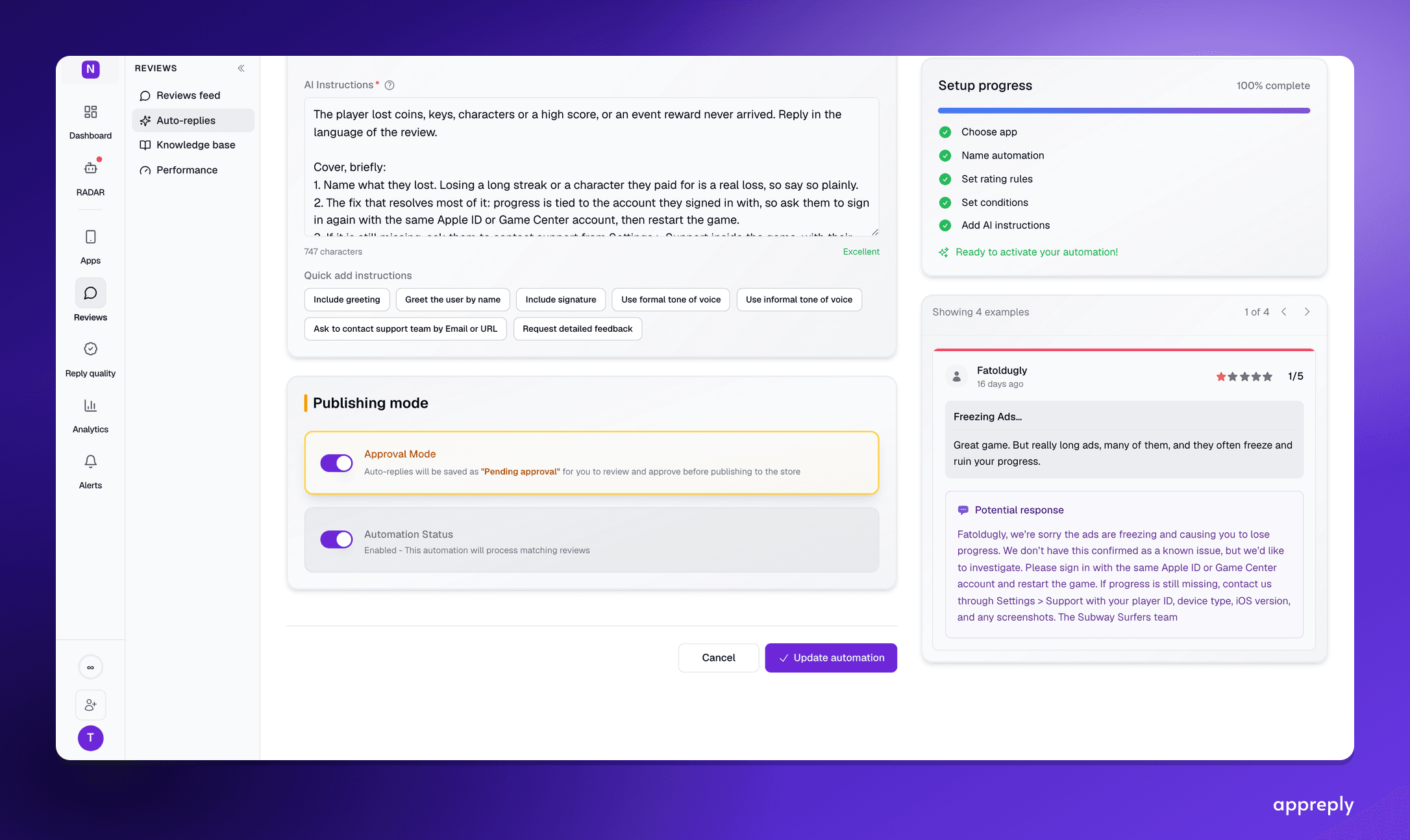
AI replies to App Store reviews: what an agent can publish on iOS, and what waits for you
How AI replies to App Store reviews work on iOS: Apple's rules, which replies to publish automatically and which should wait for approval, and what to ask an AI agent about your iOS reviews.

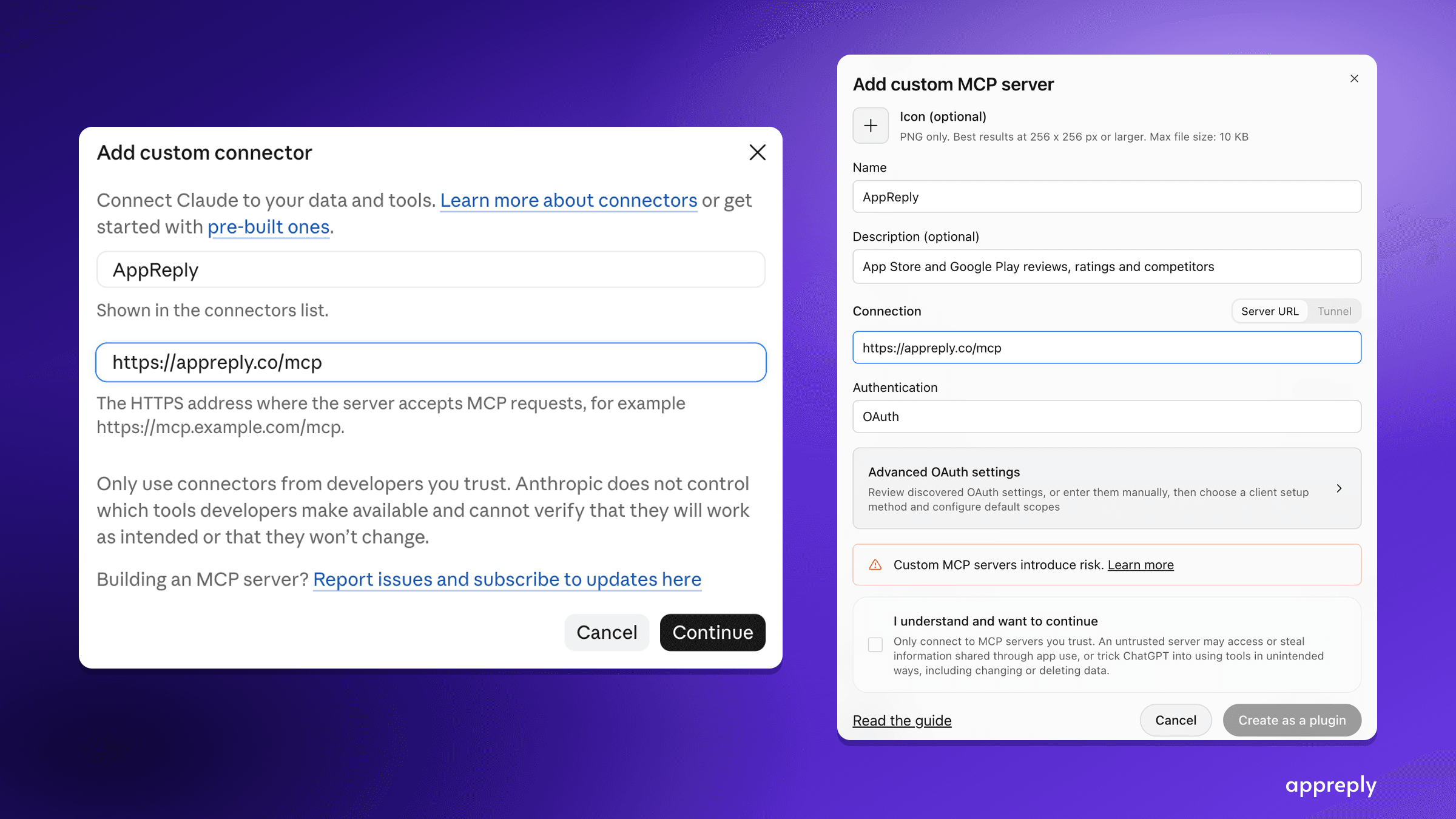
App Store and Google Play MCP server: analyze app reviews in Claude, ChatGPT or Cursor
Connect Claude, ChatGPT or Cursor to AppReply's MCP server at appreply.co/mcp. Ask about your app reviews, insights and knowledge base, or research any app on the App Store and Google Play. Setup, the 16 tools, limits and first questions.