
App Store Reviews 101: The Definitive Guide (2026)
App store review management is the work of monitoring, analyzing and replying to the ratings and reviews users leave on the Apple App Store and Google Play. For developers, that means knowing when reviews need attention, finding the complaints that repeat, and answering each one in public with something specific. This guide covers the mechanics behind both stores in 2026, from Apple's reset option to Google's 350-character limit and keyword-indexed reviews. You'll also find prompt timing strategies, response frameworks for negative app reviews, fake review detection and reporting, sentiment analysis workflows, and how to build a review management process that scales.
Key takeaways
- Most users check ratings and reviews before downloading; half will not consider an app with a 3-star rating
- Moving from 3 to 4 stars can nearly double conversion rates; apps rated below 3.5 stars have reduced visibility
- Nearly all apps given featured placement on both stores are rated 4 stars or higher
- Google Play indexes review text for search ranking — a live ASO lever most teams underutilize
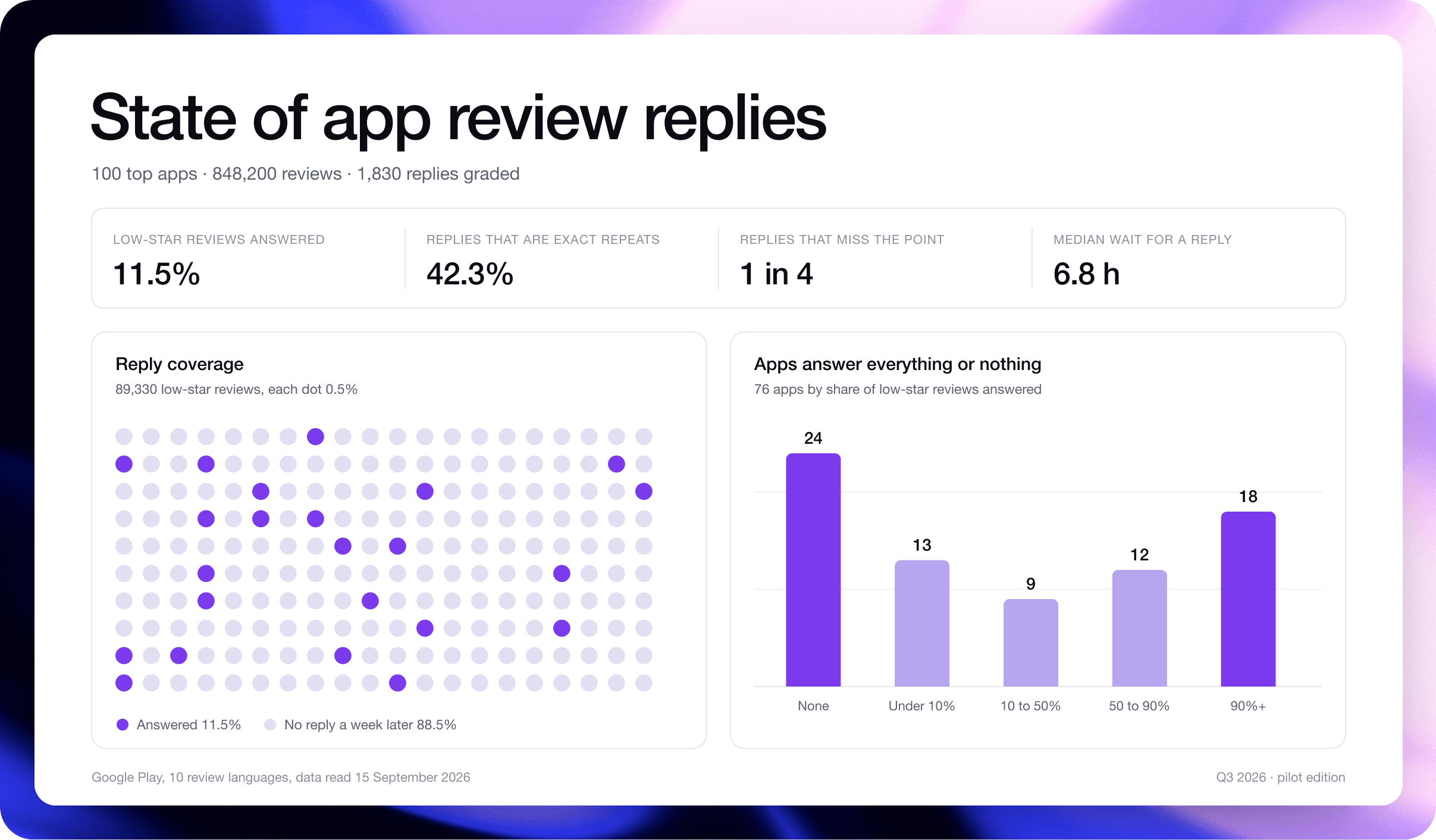
- Most apps leave low-star reviews unanswered: in our 2026 study of 100 top apps (Google Play, US top charts), 8 in 9 got no reply, and 42% of the replies that did go out were word-for-word repeats
- Fake reviews are not a shortcut: Apple purged over 143 million fraudulent ratings and reviews in 2024 and terminated 146,000+ developer accounts; only real reviews compound over time
- This guide covers every layer of app store review management as it stands in 2026 — from getting more reviews to responding effectively, handling fakes, and building workflows that scale
What are app store reviews?
App store reviews are public feedback that users leave on your Apple App Store or Google Play listing — a star rating (1–5) and an optional written comment describing their experience. Before anyone downloads your app, they read what strangers have to say about it. These ratings and comments are the last filter between a potential user and the install button. How well you manage app store reviews determines whether that filter works for you or against you.
They appear on product pages, in search results, and in featured sections. Both stores also surface a small number of featured reviews directly on your listing, so a handful of reviews get disproportionate visibility with every potential user who lands on your page. 77% of people read at least one review before downloading a free app, and 80% before a paid one (Business of Apps).
Both platforms allow only one review per user per app, though users can update their review at any time. Most teams understand the basics — the challenge is how Apple and Google handle reviews differently, and what that means for your strategy.
 Every potential user lands here before they decide to install. The star rating and the first visible reviews are the last thing standing between a browse and a download.
App store ratings vs. reviews: what's the difference?
These two terms get used interchangeably, but they are distinct.
Ratings are the numerical star score (1-5) — users can submit a rating without writing any text, and on iOS, the in-app rating prompt specifically asks for a star-only rating. Reviews, on the other hand, are the written feedback — a text comment that always includes a star rating alongside it.
Every review contains a rating, but not every rating comes with a review. Most apps receive far more ratings than written reviews, which means your star average is shaped heavily by users who rate but never write.
 Anatomy of an Apple App Store review: average rating, total rating count, and a carousel of Most Helpful reviews shown first to users.
 Anatomy of a Google Play review: average rating and review count, rating breakdown by star level, a featured review, and helpful vote count.
How are app store ratings calculated?
Apple and Google take meaningfully different approaches to calculating the rating displayed on your app's listing.
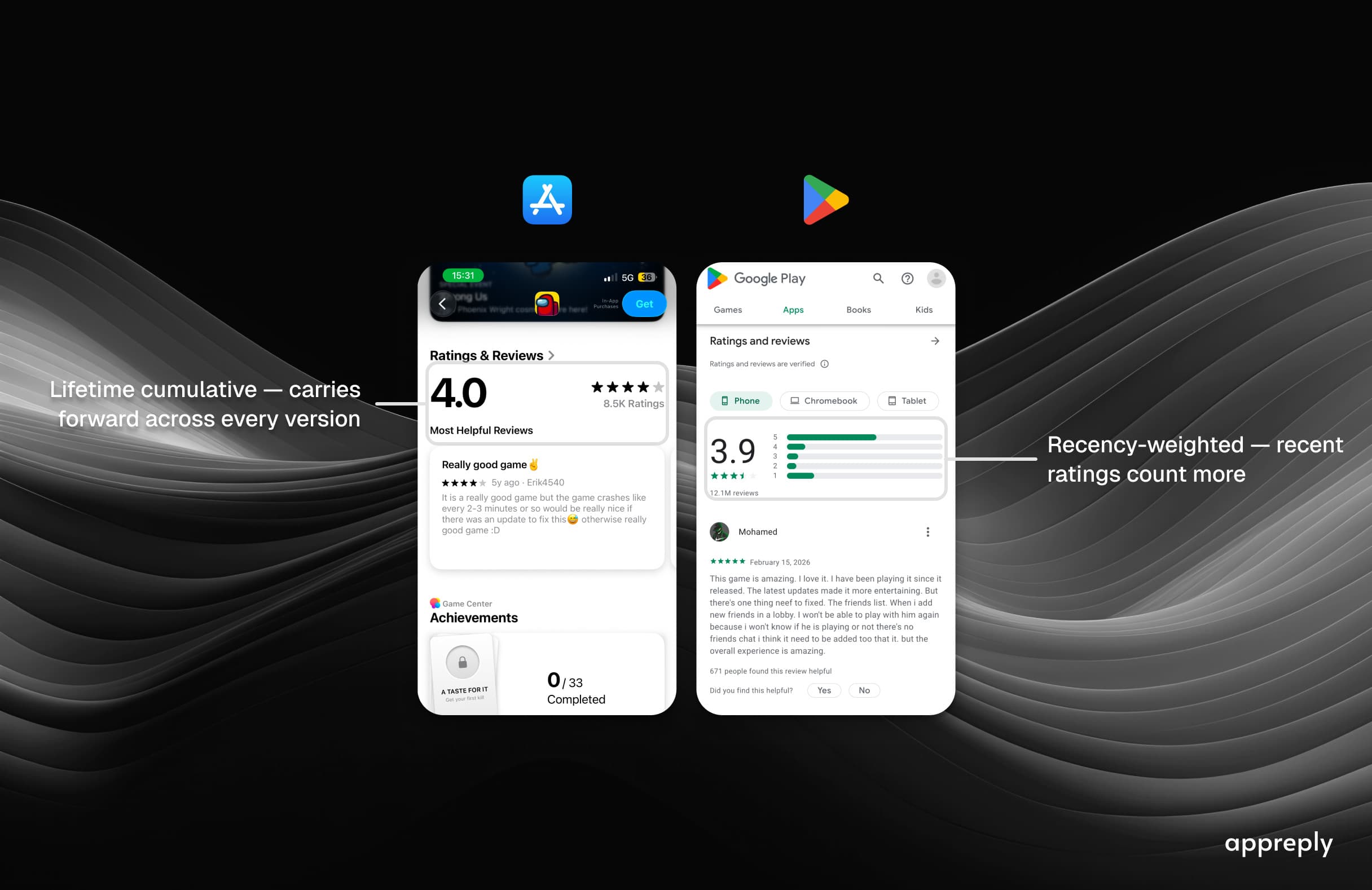
Apple App Store accumulates all ratings into a single overview rating per territory. That rating carries forward across versions unless you manually reset it when releasing a new version. A reset gives you a clean slate if your old rating was dragging you down, though Apple recommends using it sparingly because a low number of ratings can discourage downloads.
Google Play uses a weighted average that emphasizes recent ratings. In August 2019, Google replaced its lifetime cumulative formula with one that gives more weight to newer ratings. There is no reset option. If your app ships a bad update, those 1-star ratings will hit your visible score fast, but they will also fade faster as new positive ratings come in.
| Feature | Apple App Store | Google Play |
|---|---|---|
| Rating calculation | Lifetime average | Weighted (recency bias) |
| Rating reset | Yes, per new version | No |
| Min ratings to show score | Undisclosed | Undisclosed |
| Reviews indexed for ASO | No | Yes |
| Reply character limit | Not published (about 5,970 reported) | 350 chars |
| Review editing by users | Limited | Full edit anytime |
These differences matter for strategy. On Apple, you can time a rating reset around a strong release. On Google, you need a steady stream of positive ratings to keep your score healthy — there is no reset button to bail you out.
For official documentation, see Apple Developer: Ratings and Reviews and Google Play Console Help.
The same app, two very different rating systems. Apple accumulates ratings across all time unless you reset. Google weights recent ratings more heavily with no reset option. The right strategy for each platform is completely different.
Why app store reviews matter for your app's success
Your app's reviews do three jobs at once: they convince browsers to download, they tell the algorithm where to rank you, and they keep you in the range where featured apps sit (nearly all are rated 4 stars or higher). Miss on any one of these and you are losing ground to competitors who have this figured out.
How app store reviews impact downloads and conversion rates
Close to four out of five users read at least one review before downloading a free app, and four out of five before a paid one. Your screenshots get them to the page. Your reviews close the deal.
- 50% of mobile users won't consider an app with a 3-star rating (Apptentive, via Business of Apps)
- Moving from 3 stars to 4 stars can produce up to an 89% increase in conversion rate (AppsFlyer)
- Responding to a negative review can increase that rating by an average of +0.7 (Google Play)
Put together: about half of mobile users will not consider a 3-star app, and moving from 3 to 4 stars can nearly double your conversion rate. Both figures are about the star rating, which people see before they read a single review.
How app store reviews impact ASO and search rankings
Both Apple and Google factor review signals into their search ranking algorithms. The specific signals that matter: overall rating, review volume, rating velocity, sentiment, and recency.
AppTweak's 2026 benchmarks report says apps rated below 3.5 stars have significantly reduced visibility. A bad rating does not just hurt conversion — it makes your app harder to find.
One critical platform difference: Google Play indexes the actual text content of user reviews as keyword signals for search ranking. Apple does not. On Android, the words your users write in reviews can directly help (or hurt) your visibility for specific search terms. It is an organic ASO channel that most teams underutilize.
Most teams miss this: Google Play indexes your developer replies too, not just the reviews themselves.
Viktor Seraleev, Founder at Seraleev Apps and an AppReply customer
Both platforms weight recent reviews more heavily than older ones. A burst of fresh positive reviews carries more weight than a large archive of stale ones.
How app store reviews impact featuring eligibility
Getting featured by Apple or Google editorial teams is one of the highest-leverage growth events an app can experience. 95% of featured App Store apps have ratings of 4 stars or above (AppTweak), and 96% of featured Google Play apps meet the same threshold. That is a correlation, not a published rule.
Strong reviews convert your existing traffic and earn you more of it. Higher keyword rankings, more featuring opportunities, and access to the most valuable free distribution channel either platform offers.
For teams managing a portfolio of apps, these effects multiply. A 0.3-star improvement across 20 apps doesn't just add up. It compounds through better rankings, more featuring opportunities, and higher conversion at every touchpoint.
Types of app store reviews
A 1-star review about a billing error and a 1-star review from a coordinated review bomb look identical in your average, but they require completely different responses.
The 7 review types at a glance:
- Bug reports and performance complaints — crashes, freezes, broken features
- Feature requests and suggestions — missing capabilities users want
- Praise and positive experiences — your strongest differentiators in users' words
- Update-related reviews — reactions to recent releases (positive or negative)
- Comparative reviews — users mentioning competitors by name
- Billing and subscription complaints — pricing, charges, cancellation friction
- Review bombs — coordinated negative review waves
 Not all 1-star reviews are created equal. A billing complaint and a coordinated review bomb both tank your rating but need completely different responses — and different teams.
Bug reports and performance complaints are your highest-priority reviews. Users reporting crashes, freezes, or broken features are telling you exactly what is costing you retention. They tend to cluster around specific app versions or devices, making them actionable if you track patterns.
App crashes every time I try to open my saved projects. Started after the last update. iPhone 17 Pro, iOS 26.4. — 1 star
Battery drain is insane since v3.2. My phone goes from 80% to 30% in an hour with this app running in the background. — 2 stars
Feature requests and suggestions come from users asking for capabilities your app does not have yet. Individually, these are low-urgency. In aggregate, they are a product roadmap signal. When dozens of users independently request the same feature, that is evidence worth taking to sprint planning.
Would be 5 stars if you could export to PDF. I end up screenshotting everything which is ridiculous. — 4 stars
 Real examples of feature request reviews — users suggesting new capabilities and improvements they want to see in the app.
Praise and positive experiences go beyond the obvious rating benefit. Positive reviews often highlight your strongest differentiators in the user's own words — language you can mine for marketing copy and ASO keywords, especially on Google Play, where review text is indexed.
 Real examples of positive app store reviews — users praising apps with high ratings and developer responses.
Update-related reviews spike immediately after a release and can swing hard in either direction: gratitude for a long-requested fix, or frustration when an update breaks something that was working. Monitor these closely in the 48-72 hours after every release.
Comparative reviews are those where users mention competitors by name. These are competitive intelligence in raw form — they tell you exactly why someone chose your app over an alternative, or why they are about to leave.
Billing and subscription complaints cover reviews about pricing, refunds, unexpected charges, or difficulty canceling. These carry weight because they signal churn risk and can trigger app store policy scrutiny if they accumulate.
Review bombs are coordinated waves of negative reviews, often triggered by a controversial change, a viral complaint, or external events unrelated to app quality. These require a different playbook: rapid public response, escalation to platform support, and clear communication about what you are changing.
Report the wave: both stores remove reviews that break their policies. Apple says it removed more than 143 million fraudulent ratings and reviews in 2024.
App store review policies and guidelines
Break these rules and you will lose reviews, face rating penalties, or get your app pulled from the store. Both Apple and Google enforce strict app store review guidelines on what users can post and what developers can do to influence their mobile app reviews.
Apple App Store review policies
Apple requires reviews to be relevant to the app experience. Prohibited content includes spam, fake reviews, offensive language, personal information, and content unrelated to the app itself.
Moderation combines automated systems and manual review. Apple's machine learning filters flag suspicious patterns — bulk submissions from similar accounts, reviews posted immediately after install without meaningful app usage, and coordinated rating activity.
Apple removed more than 143 million fraudulent ratings and reviews in 2024 (Apple Newsroom). Apple also reserves the right to remove reviews that violate its guidelines without notifying the reviewer.
Developers can report reviews they believe violate guidelines through App Store Connect, but Apple makes the final call on removal.
Google Play review policies
Google Play's content policy covers similar ground — no spam, no fake reviews, no off-topic content, no hate speech, and no personally identifiable information. Google also prohibits reviews primarily about third-party topics rather than the app itself. See Google Play's developer content policy for the full list.
Google's moderation leans more heavily on automated detection than Apple. Reviews that trigger policy filters may be removed immediately or flagged for secondary review. Google also uses behavioral signals — such as whether the reviewer actually used the app — to assess review authenticity.
Google Play allows users to fully edit their reviews at any time, which means a resolved complaint can turn a 1-star review into a 4-star review if you respond effectively. On Apple, editing is more restricted.
Common app store review policy violations
The violations that most frequently lead to review removal or developer penalties fall into four categories. Spam and fake reviews — purchased reviews, bot-generated ratings, or reviews from accounts that never used the app — are the most aggressively targeted by both platforms. Incentivized reviews are also prohibited: offering rewards, discounts, or in-app currency in exchange for reviews violates both Apple and Google policies, even if you do not specify that the review must be positive. Both platforms also remove off-topic content, such as reviews about unrelated political opinions or personal grievances with the company rather than the app itself. Finally, reviews containing personal information — names, phone numbers, email addresses, or other identifying information about individuals — are removed on sight.
The four violation categories that trigger removal:
- Spam and fake reviews — purchased, bot-generated, or from non-users
- Incentivized reviews — rewards or discounts offered in exchange for ratings
- Off-topic content — political opinions, personal grievances unrelated to the app
- Personal information — names, phone numbers, or email addresses of individuals
There is no clever workaround here. Apple removed more than 143 million fraudulent ratings and reviews in 2024 alone. The only review strategy that compounds over time is building something people genuinely want to praise — and prompting them at the right moment.
 Knowing what gets reviews removed matters — especially the incentivized reviews rule, which catches many teams by surprise. Offering any reward for a review violates policy even if you don't ask for a positive one.
How to get more app store reviews
App store review volume is a ranking signal, a conversion driver, and your largest source of unstructured product feedback. But most apps leave reviews to chance — and end up with a handful of ratings that skew negative, because unhappy users are more motivated to write. The fix is a deliberate prompt strategy: ask right after a user succeeds at something.
Time your review prompts right
The single biggest lever for increasing app store reviews is timing. Prompt at the wrong moment and you'll either get ignored or — worse — catch a frustrated user mid-task.
The best moment to ask is right after a positive outcome — a completed task, a milestone reached, a successful purchase or booking. Conversely, never prompt on first launch, during onboarding, or after an error — these are high-friction, low-goodwill moments where a review request feels tone-deaf.
Build in guardrails: a 90-day cooldown between prompts and a lifetime cap (2-3 total) keeps you from annoying loyal users. Do not add a "How's your experience so far?" screen in front of the prompt. That is review gating, and Google Play forbids asking any question before or while showing the rating card. Ask at a success moment instead, and keep a separate feedback route in settings for unhappy users. Our in-app review prompt guide covers the rules and the code for both platforms.
A gated flow: a satisfaction question decides who sees the store prompt. It lifts the average, and Google Play does not allow it. The compliant version is in our in-app review prompt guide.Use SKStoreReviewController and Google's In-App Review API
Both Apple and Google provide native in-app review APIs, and using them is non-negotiable. Native prompts bring far more ratings than directing users to the store: Tokopedia told Google its five-star ratings grew 4x after adopting the Android in-app review API. The friction difference is enormous.
Apple — SKStoreReviewController:
SKStoreReviewController still works, but it is deprecated from iOS 18.0. For new code, Apple's documentation points to AppStore.requestReview(in:); our guide on how to ask for app reviews has the code. The cap is unchanged: 3 prompts per user per 365 days, and the system may suppress the prompt entirely. You request it, Apple decides whether to show it. In development builds the prompt always appears; in TestFlight it never does; on the live App Store, it's rate-limited. You cannot customize the UI or detect whether the prompt was actually displayed.
 The native iOS SKStoreReviewController review dialog. You cannot customize the UI or detect whether it was actually displayed — Apple controls everything.
Google — In-App Review API (ReviewManager):
Google's In-App Review API operates under similar constraints — Google controls display frequency and may suppress the prompt. The key difference is that the review flow happens entirely inside your app, without redirecting users to the Play Store.
 The Google In-App Review API bottom sheet. The review flow happens entirely inside your app — no redirect to the Play Store.
Optimization criteria — only trigger the prompt for users who meet all of these: installed the app at least 7+ days ago, completed 2-3+ sessions, had a crash-free last session, and have not been prompted in the past 90 days. These are starting points, not store rules.
Segment your audience for higher-quality app reviews
Segment by how well a user knows the app, never by the rating you expect them to give.
In practice the eligibility rules are about timing: no prompt in the session after a crash, wait for a completed purchase or a finished level, and never prompt while a support ticket is open.
If you need a framework for identifying which users are truly engaged, Reforge's retention metric guide breaks it down into three components: how often (frequency), what action (core action), and who (user segment). The same XaY framework applies directly to review prompt targeting: define the frequency, core action, and user segment that show a user knows the app before triggering any prompt.
 Reforge's retention metric framework — Frequency (X), Core Action (a), and Who (Y) — the same components that define retained users also define your ideal review prompt audience.
Build in-app feedback channels to prevent negative reviews
Give users a private way to complain before they go public. A simple "Did something go wrong?" prompt after errors or failed actions intercepts frustration and routes it to your support team instead of the App Store.
This works because most 1-star reviews aren't about deep product failures — they're about small moments of friction where the user had no other outlet. A feedback form, an in-app chat widget, or even a "Contact us" button in the right place keeps those complaints private and fixable.
Every 1-star review you prevent saves the roughly 7 five-star reviews it takes to get back to a 4.5 average.
AppReply drafts personalized, platform-aware responses for every review, so your team reviews and publishes instead of writing from scratch.
See how it worksHow to respond to app store reviews
Responding to app store reviews is one of the most effective growth levers for apps — and one of the hardest to do consistently at scale, because every response needs to be personalized, platform-appropriate, and timely. Google says responding to a negative review can increase that rating by an average of +0.7 stars.
Reply to low-star reviews within a day, name the problem the reviewer raised, and give one next step. For the step-by-step version of everything in this section, including permissions, worked replies for eight kinds of review and a quality checklist, see our full guide on how to respond to app store reviews.
How to respond on Apple App Store
To respond to reviews on the App Store:
- Open App Store Connect
- Go to Apps and select your app
- Navigate to Ratings and Reviews
- Click Reply next to the review you want to respond to
- Write your response and click Submit
A few details worth knowing: you'll need an Account Holder, Admin, or Customer Support role to respond. Responses take up to 24 hours to appear publicly. Apple does not publish a character limit; developers report about 5,970 characters, which is plenty of room, though brevity usually serves you better. When you reply, the reviewer gets a notification and can update their review afterward, which is exactly the behavior you want to encourage.
 App Store Connect's reply interface. Your response won't appear publicly for up to 24 hours — so don't post a placeholder intending to edit later. The first reply triggers the reviewer notification.
How to respond to Google Play reviews
To reply to reviews on Google Play Console:
- Open Google Play Console
- Go to Monitor and Improve → Ratings and Reviews → Reviews
- Find the review and type your response in the "Your reply" field
- Click Submit
Google Play imposes a tighter 350-character limit, so every word counts. On the positive side, responses appear immediately with no moderation delay. One third-party test found that Google Play indexes some review text for search, and developer replies too. Google documents neither, so write for the reviewer and never stuff keywords into a reply.
One important nuance about notifications: your first reply is your best (and often only) shot at re-engaging the reviewer. Get it right rather than posting a placeholder and editing later.
| Behavior | Apple App Store | Google Play |
|---|---|---|
| First developer reply | Reviewer is notified (Apple does not say how) | User gets a push notification + email |
| Subsequent replies (same review) | Not documented by Apple | No new notification |
| Reply after user updates review | Not documented by Apple | User notified again |
| Response character limit | Not published (about 5,970 reported) | 350 characters |
| Response visibility delay | Up to 24 hours | Immediate |
Source: Google Play Developer API — Reply to Reviews, Apple Developer — Ratings, Reviews, and Responses
App store review response best practices
Speed matters — and in 2026, user expectations are far higher than they used to be. The old advice of responding within 72 hours is now table stakes. In our 2026 study (Google Play, US top charts), teams that answer at all did it in a median of 6.8 hours, and 61% replied within a day, so treat a day as the bar for low-star reviews and faster as an advantage. A fast, specific response signals that a real team is listening — not a bot firing templates into the void. Users who receive prompt, substantive responses are significantly more likely to update their rating. Beyond speed, the quality of your response depends on a few principles:
- Acknowledge the specific issue the reviewer mentioned. Generic "thanks for your feedback" replies feel dismissive and can backfire.
- Stay factual, not apologetic. Blanket apologies read as templates. That includes indirect apologies like "we understand your frustration" or "we regret the inconvenience," which sound empathetic in isolation but read as boilerplate when a user scrolls through ten of your responses in a row. Acknowledge the concern without accepting blame, then point toward a resolution.
- Offer solutions, not excuses. Users don't care whose fault it is. They care whether it's getting fixed.
- Never disclose internal processes. "I've escalated this to our engineering team" or "this has been logged in our bug tracker" means nothing to the reviewer. Tell them what they should do next, not what's happening inside your organization.
- When you're not confident in the answer, redirect to support. A short response pointing the user to your support channel is better than a long response that turns out to be wrong. Incorrect guidance in a public reply stays visible until someone notices and edits it.
- Personalize the greeting, but check the name first. Use a first name if it's clearly a real name. If the reviewer's display name looks like a username or handle, skip the name and use a general greeting instead. Addressing someone as "Hi xXDarkLord99" undermines the tone of the rest of your response.
- Never include personal information or marketing language. Keep it professional and helpful, especially on Google Play where you only have 350 characters.
- Mind your formatting. Review responses render as plain text on both stores. Markdown, bullet points, and line breaks you see in your dashboard may not display the way you expect on the user's device. Write in short, flowing sentences. On Google Play especially, keep it to a single paragraph.
Use templates as starting points, never as final copy. Every response should feel like it was written by a human who actually read the review.
Most apps are not there yet. In State of app review replies 2026, we looked at 89,330 low-star reviews across 100 top apps (Google Play, US top charts). Only 11.5% had a developer reply a week later. Of the replies that did go out, 42% repeated another reply from the same app word for word. About 1 in 4 graded replies to a complaint missed what the reviewer actually raised, by an AI grade that a person disagreed with on 1 reply in 10. Speed was not the problem: when a reply came, the median wait was 6.8 hours. The gap is coverage first and quality second. A third-party write-up says Google's app quality audit checks whether replies are templated or personal; Google has not published that as policy.
 A generic, fluffy developer response that sounds polite but says nothing — the kind of reply users scroll past.
 A specific, actionable developer response that references the real problem and gives the user something to do.
How to respond to negative app store reviews
Negative reviews are your best conversion opportunity. A 2018 study of 2,328 top free Google Play apps found 4.4% of replied reviews had their rating raised, against 0.7% with no reply, an association, not proof. Flipping a negative is far more efficient than chasing new positives — it takes roughly 7 five-star reviews to offset a single 1-star review in your average. For 12 paraphrased real replies, 4 graded pass or fail and 8 that got a rating raised, see how to respond to negative app reviews.
You have probably been told to apologize first. That advice sounds reasonable but breaks down at scale and in practice. When you manage hundreds of reviews across multiple apps, blanket apologies ("sorry to hear that," "we apologize for the inconvenience") start reading as templates, because they are. Worse, accepting blame in a public response can set expectations your team cannot meet, or create liability issues for billing and data complaints.
What works better: acknowledge the specific concern factually, then move toward a resolution. The reviewer wants to know you read their review and that something will happen as a result. You don't need to say sorry to prove that.
Before you write any response, run through a quick validation:
- Check the platform. Is this an iOS or Android review? Never reference iOS settings in a Google Play response or vice versa. This sounds obvious but happens constantly with copy-paste workflows.
- Detect the language. Reply in the same language the user wrote in. A response in English to a review written in Portuguese signals that nobody actually read it. In our 2026 study (Google Play, US top charts), 13% of replies were in a different language from the review, and 96% of those were in English.
- Check for vague reviews. If the review is short and the complaint is unclear ("bad app," "doesn't work"), ask what specifically did not meet expectations. Do not guess the problem.
- Check for mismatched sentiment. Some users leave positive text with a low star rating. If the review says "great app, love it" but shows 2 stars, thank them and ask if they would consider updating their rating. Ask only when both the tone and the topic are positive. If the text mentions any problem, answer the problem and leave the rating alone.
The 5-step negative review response:
- Acknowledge the specific issue the reviewer described. No generic "thanks for your feedback."
- Stay factual. Do not apologize, accept blame, or get defensive. Acknowledge the concern without owning fault.
- Provide actionable next steps. Give the user something concrete: a setting to check, a workaround to try, or a support URL for complex issues.
- Do not promise timelines or future features. Saying "we'll fix this in the next release" creates a public commitment your product team may not keep.
- Keep it concise. Two to four sentences for simple issues, up to six for technical guidance. Walls of text in review responses go unread.
Review response templates by category
Treat these templates as structures to adapt, not text to paste: in our 2026 study of 100 top apps (Google Play, US top charts), 42% of replies were word-for-word repeats. Every response should reference the specific issue from the review. A reply that sounds like it was written by someone who actually read the review will always outperform a copy-paste template.
-
Bug report: "Thank you for the details. We've noted the issue with [specific bug] on [platform/version]. Try [workaround] in the meantime. If that does not help, reach out to [support URL] with your device info so we can investigate further."
-
Feature request: "Appreciate the suggestion. [Feature] is not available today. For now, [alternative or workaround] may help with what you're looking for."
-
Billing complaint (unexpected charge): "Subscriptions purchased through [Google Play / App Store] are managed by that platform. To verify your subscription status, go to [platform-specific path]. If the charge still looks incorrect, contact us at [support URL] so we can review the details."
-
Billing complaint ("charged after I deleted the app"): "Uninstalling the app does not cancel the subscription. Subscriptions purchased through [Google Play / App Store] need to be cancelled through that platform's settings. To check, go to [platform-specific subscription management path]. If it shows cancelled and you were still charged, contact us at [support URL]."
-
"Scam" or "fraud" accusations: "We note your concern about the charge. [App name] uses a subscription model, and payment details provided during the free trial are only charged when the trial period ends. To review your subscription status, go to [platform-specific path]. For further assistance, reach out to [support URL]."
-
Positive review: "Glad to hear [specific feature] is working well. If you haven't tried [related feature] yet, we think you'd find it useful."
-
Positive text with low rating: "Thanks for the kind words! It sounds like you're having a good experience. Would you consider updating your rating to reflect that?"
-
Post-update frustration: "We hear you on the recent changes. [Brief one-sentence reasoning.] If you're having trouble adjusting, reach out at [support URL] and we'll walk you through the new flow."
-
Comparative review (mentions competitor): "Thanks for the honest feedback. We've been focused on [your unique strength] and are continuously improving. Happy to hear specific suggestions at [support URL]."
-
Vague negative review ("bad," "useless"): "We'd like to help, but we need a bit more detail. What specifically did not work as expected? That way we can point you in the right direction."
Scaling review responses without losing quality
Templates get you started. They do not get you to 500 reviews a month across multiple apps without quality degrading. The teams that sustain high response quality at scale build a response priority system rather than relying on templates alone:
- Check similar past responses first. What did your team say the last time someone reported this exact issue? Reusing proven responses with minor personalization is faster and more consistent than composing from scratch every time.
- Fall back to your knowledge base. If no similar response exists, reference your internal documentation: known bugs, billing FAQs, feature status. This keeps responses accurate even when the person replying is not a product expert.
- Compose custom only as a last resort. If neither similar responses nor your knowledge base covers the topic, write a short reply acknowledging the concern and directing to support. Do not guess.
This priority order does two things: it keeps response quality consistent across team members, and it makes onboarding new support staff dramatically faster. A new hire can start replying to reviews on day one if they have a searchable library of approved past responses to pull from.
Asking users to update their rating
You can ask a reviewer to update their rating, but only when the review is clearly happy: warm words about something that went well, under a low star count.
The positive-text, low-rating pattern. A surprising number of reviews contain genuinely positive text paired with 1, 2, or 3 stars. Sometimes it is an accidental tap. Sometimes the user is happy overall but docked stars for a single missing feature. Rating habits also differ by country, so a low star count does not always mean an unhappy user.
Why asking works. When you reply to a clearly happy review that carries a low rating and ask whether the rating still fits, some reviewers update it. You are not changing someone's mind. You are helping someone whose mind is already made up express it accurately.
How to do it well:
- Ask only under a clearly happy review. Scan for reviews where the text is clearly positive but the rating is 3 stars or below. Both the tone and the topic have to be positive: "love it, but it crashes on login" is a complaint, not a candidate. Answer the crash and leave the rating alone. Asking under a complaint is a common mistake: in our 2026 study of 100 top apps (Google Play, US top charts), one kids game asked low-star reviewers for a higher rating 313 times with the same sentence.
- Acknowledge what they liked first. Reference the specific feature or experience they mentioned. This proves you read the review.
- Ask for an update, not a star count. Never name five stars or any other number, and never offer anything in return.
- Keep it light. This is a suggestion, not a demand. "Would you consider updating your rating?" works. "Please change your rating to 5 stars" does not.
- Localize the ask. Reply in the user's language, and be aware that the framing may need to change by market.
Now multiply these templates across 10 apps, 2 platforms, and 500 reviews per month. Each response needs to reference the specific issue, the specific app version, and often the specific user context. At that volume, the question is not whether to respond. It is whether your current process can sustain response quality without burning out your team or missing your SLAs.
Managing reviews manually across apps and platforms breaks down fast. AppReply handles triage, routing, and responses, so you can focus on product.
Book a demoHow to handle fake and spam app store reviews
Fake app store reviews are a real problem. Apple says it processed over 1.2 billion ratings and reviews in 2024 and removed more than 143 million fraudulent ones, about 1 in 8. It also terminated more than 146,000 developer accounts over fraud concerns. Google Play publishes less detail. If you're not actively watching for spam reviews in your app store listings, you're flying blind.
How to spot fake app store reviews
Red flags that signal a review isn't legitimate tend to compound.
Real reviews trickle in over days and weeks; fake ones arrive in clusters, often dozens within the same hour. That batch-arrival pattern is usually the first signal. Look at the content next — vague, generic language like "great app" or "terrible, don't download" with zero product-specific detail is a hallmark of manufactured reviews, and near-identical wording across multiple accounts removes any remaining doubt. The accounts themselves often tell the story: no review history, no profile photo, created days before the review appeared. A particularly common attack pattern is a sudden spike of 1-star reviews from accounts that show no evidence of having used your app at all.
One pattern alone isn't proof. But two or three together? That's a strong signal worth investigating.
Red flags at a glance:
- Batch arrivals — dozens of reviews within the same hour
- Generic language — vague praise or criticism with zero product-specific detail
- Duplicate wording — near-identical text across multiple accounts
- New or empty accounts — no review history, no profile photo, created days before posting
- 1-star spikes from non-users — sudden negative waves from accounts with no evidence of app usage
How to report and remove fake reviews
The process differs slightly by platform:
Apple App Store (see Apple's review guidelines):
- Tap and hold the suspicious review
- Select "Report a Concern"
- Fill in the details — include why you believe it's fraudulent
- Submit
Google Play (see Google Play review policies):
- Click the three dots next to the review
- Select "Report review"
- Choose the relevant reason
- Submit
Processing takes days to weeks. There's no guarantee of removal — both platforms make the final call. For persistent patterns, contact Apple or Google developer support directly with a documented evidence package: screenshots, timestamps, text comparisons, and account details.
How to respond to review bombing
Review bombing is the coordinated submission of negative reviews — often by competitors or organized groups. It can tank your rating overnight if you're not prepared.
The moment you detect a review bombing incident, your first move is documentation. Capture timestamps, account creation dates, text similarities, and rating distribution shifts — this evidence package is what Apple and Google need to act. Report through the standard channels with your documentation organized clearly; the more structured your submission, the faster the platforms respond.
While you wait for platform action, respond professionally to each review. Future users browsing your listing will see your responses alongside the attacks, and calm, helpful replies signal credibility far more effectively than the fake reviews can undermine it. Set up alerting tools so you catch rating anomalies early — a sudden drop from 4.5 to 3.8 in 24 hours is not organic, and the sooner you know, the sooner you can respond. If the standard reporting process stalls, escalate through dedicated developer support channels with your full evidence package.
App store review analysis and sentiment
Your app has thousands of reviews. Somewhere in that pile are the three things most likely to churn your users next quarter. App store review analysis is how you find them — extracting patterns from individual reviews across platforms, languages, and app versions.
What is sentiment analysis for app reviews?
Sentiment analysis uses NLP and machine learning to classify reviews as positive, negative, or neutral. But it goes deeper than star ratings alone.
A 3-star review might contain a critical feature request. A 5-star review might mention a bug in passing. Star ratings tell you how much someone liked your app. Sentiment analysis tells you why.
Modern sentiment analysis for app reviews identifies themes: bug patterns, feature requests, onboarding friction, pricing complaints, satisfaction trends. It groups individual opinions into categories your product team can act on — so your roadmap is based on what users actually say, not what you assume they think.
How to analyze app reviews for product insights
Start by grouping reviews into meaningful categories — onboarding, payments, performance, specific features. Manual tagging doesn't scale past a few hundred reviews, so automated topic clustering is essential once you reach meaningful volume. With reviews categorized, track how sentiment within each category shifts over time, especially before and after major updates. Did that new checkout flow actually reduce payment complaints, or just shift them to a different part of the funnel?
Version-level comparison is where review analysis is most useful: measuring whether each release improved user perception or introduced new friction gives your team a feedback signal that no amount of internal QA can replicate. And don't limit your analysis to your own app. Mining competitor reviews for recurring praise and recurring pain points reveals market gaps your roadmap should address. The final step is making sure these categorized insights reach the people who can act on them — route findings directly into sprint planning and roadmap discussions so that review data shapes product decisions rather than sitting in a dashboard no one checks. For a look at how this works in practice — AI summaries across filtered slices, custom topic tracking, and Slack-integrated weekly briefs — see how we built multi-app review intelligence into AppReply.
Apple vs Google Play differences in review analytics
The two platforms treat reviews differently in ways that affect your analysis strategy.
Google Play: Reviews contribute directly to keyword indexing. If users frequently mention "budget tracker" in positive reviews, your app can rank higher for that search term. This makes review content an ASO lever — not just a feedback channel.
Apple: Introduced AI-generated review summaries in 2025 starting with iOS 18.4+. An LLM now generates highlights from your reviews that appear directly on your product page. This means individual review quality matters more than ever — low-quality or negative reviews can shape the AI summary that every potential user sees.
Both platforms: Developer responses are publicly visible. They factor into how users perceive your brand and whether they trust your team to address issues.
AppReply clusters your reviews into actionable themes automatically, so product insights reach the right team without manual tagging.
Explore review intelligenceApp store review management: building a workflow
The standard advice is to respond to reviews. The harder part is doing that at scale: across multiple apps, across platforms, across teams with different responsibilities. Responding to reviews isn't a task. It's a workflow. And without a system, it breaks down the moment your app hits meaningful volume.
A publisher with 15 apps averaging 200 reviews per month is dealing with 3,000 reviews across two platforms with different interfaces, character limits, and indexing rules. Responding to even 20% of those within 24 hours requires dedicated headcount — or tooling.
Set up review monitoring and alerts
Step one is centralization. Switching between App Store Connect and Google Play Console doesn't scale past a single app with low review volume. You need app store review monitoring that aggregates reviews from every platform, every app, and every storefront into one view. From that centralized view, configure alerts for the events that demand immediate attention: rating drops below your threshold, negative review spikes, and featured reviews that need priority responses. Then set response SLAs and enforce them. In our 2026 study (Google Play, US top charts), when a reply came, the median wait was 6.8 hours. Treat a day as the bar for low-star reviews.
Prioritize what to respond to first
Not all reviews are equal. When you're behind, triage like this:
- Featured reviews — highest visibility. These are the reviews potential users see first when browsing your listing.
- Negative reviews from recent versions — signals active issues your engineering team needs to know about now.
- Detailed constructive feedback — highest product insight value. Worth routing directly to your PM team.
- Positive reviews — builds community, encourages more reviews, and shows you're actively engaged.
Create review management automation rules
Manual review management doesn't scale. Automation handles the volume so your team can focus on the reviews that need a human touch. For an example of what a production-grade automation setup looks like — featured review detection, approval workflows, and multi-app routing — see what shipped in AppReply 1.0. To keep automated replies accurate without reading every one, see our AI auto-replies guide.
The foundation of any automation setup is dividing reviews by the type of attention they need. Four- and five-star reviews can receive auto-generated replies using personalized templates, not generic "thanks for the review" copy, but responses that reference the specific praise when possible. One- and two-star reviews, by contrast, should route directly to human support for manual, thoughtful responses. These are the reviews where a real person's attention makes the difference between a churned user and a recovered one. Layer on auto-translation for foreign-language reviews so your team can assess content before responding, and tag every incoming review by topic: billing issues to support, crash reports to engineering, feature requests to product. The right team sees the right feedback without manual sorting.
Using AI to manage app store reviews in 2026
The promise of AI-generated review responses is compelling. The reality, without the right setup, is a liability. A generic LLM pointed at your reviews will hallucinate features your app does not have, promise timelines your team cannot meet, and produce responses that sound helpful but are factually wrong. At best, users ignore them. At worst, you create public commitments you cannot keep.
The difference between AI responses that work and AI responses that damage your brand comes down to one thing: the context layer.
Every AI-generated reply, whether fully automated or drafted for human approval, must be grounded in your actual product knowledge. AppReply's MAX framework organizes this context into three layers — Memory, Articles, eXpertise rules — each building on the last:
1. Memory — past successful responses. Your best existing replies, the ones that led to rating updates or resolved complaints, should be the first source the AI checks. If someone reported the same billing issue last month and your team wrote a response that led to a rating update, the AI should use that proven response as a template rather than generating from scratch. This is the single most important context source. It keeps responses consistent across team members as the approved library grows. Every approved reply can be retrieved for later drafts in the same account.
2. Articles — your product knowledge base. Your FAQ articles, support documentation, known issues, billing policies, and platform-specific guidance. This is what keeps answers grounded in your documents. If the AI does not have a documented answer for a user's question, it should redirect to your support channel rather than inventing one. For a mid-size app portfolio, this typically means 20-40 documents covering your core product areas.
3. eXpertise rules — per-app, per-platform. Each app on each platform needs its own instruction set. Your Android billing guidance is different from your iOS guidance. Your free-tier app handles feature requests differently than your premium app. These rules define brand voice, banned phrases (no apologies, no timeline promises), escalation paths, and platform-specific details like subscription management steps. A well-scoped rule set runs around 5,000-10,000 characters per app per platform.
When the MAX context layer is built correctly, the difference is inspectable. Detailed per-app instructions, comprehensive FAQ coverage, and a growing library of approved past responses give each draft better account-specific context. On Enterprise, when AppReply manages setup, it includes a 95% reply accuracy commitment against an agreed Reply Quality scorecard, with continuous checks surfacing the remaining exceptions.
What to look for in an AI review response system:
- Context-aware generation, not just prompting. The AI should pull from your knowledge base and past responses automatically, not require you to paste context into every prompt.
- Per-app, per-platform scoping. One set of instructions for all your apps is not enough. Each app has different features, different known issues, and different user expectations.
- Memory from your own approved responses. When your team approves or edits a reply, that response can become future context inside the same account.
- Confidence-based escalation. When the AI is not confident in its answer, it should default to a short reply directing the user to your support channel rather than generating a longer response that might be wrong.
- Prompt injection and content safety protections. Review text is user-generated input. The AI system needs guardrails against users who embed instructions in their review text attempting to manipulate the response.
Measure what matters
Five metrics separate teams that manage reviews from teams that think they do:
- Response rate — percentage of reviews you respond to. Target: 100% for 1-3 star reviews, 50%+ for 4-5 star.
- Response time — average hours from review posted to response sent. Shorter is better, but consistency matters more than speed.
- Rating trend — weekly and monthly trajectory, not just your current average. Direction matters more than position.
- Review-to-update conversion — how often your responses lead users to edit and improve their review. This is the highest-signal metric for response quality.
- Sentiment distribution — track changes over time in positive, negative, and neutral split. Correlate shifts with releases, campaigns, and incidents.
How to recover your app store rating after a drop
When your rating drops below 4.0, you need a recovery plan — not just hope that better reviews will eventually arrive.
On Apple, use the rating reset strategically. Wait until you've shipped the update that fixes the issues driving negative reviews, then reset your rating with that version. Resetting before the fix is live clears the old average and collects the same complaints against a new one.
On Google Play, there is no reset. Recovery depends on sustained positive momentum. Google's recency-weighted algorithm means recent ratings carry disproportionate weight, so a steady run of genuine recent ratings moves the visible score faster than a lifetime average would. The key is ensuring the underlying issues are actually fixed before you increase prompt volume — otherwise you're funneling frustrated users toward a review prompt.
Across both platforms, reply to the existing negative reviews. Google says responding to a negative review can increase that rating by an average of +0.7 stars. That is per review, not your overall score. Start with the reviews that named the problem you have fixed, then the other 1-star and 2-star reviews from the last 90 days. Pair replies with review prompt timing: show the native prompt after a success moment.
There is no fixed number of weeks for a rating to recover. Find the cause before you reply: our app store rating recovery guide covers the five causes and how to measure reply effect.
Apple App Store vs. Google Play: complete review comparison
iOS app reviews and Android app reviews follow different rules — and getting these differences wrong means wasting effort on tactics that only work on the other platform. This comparison covers every difference that affects your review management workflow, ASO strategy, and response prioritization.
| Feature | Apple App Store | Google Play |
|---|---|---|
| Rating calculation | Lifetime average | Weighted toward recent ratings |
| Rating reset option | Yes (per new version release) | No |
| Min ratings to display score | Undisclosed | Undisclosed |
| Review keyword indexing | No (reviews don't affect ASO keywords) | Yes (review keywords boost search ranking) |
| Developer reply character limit | Not published (about 5,970 reported) | 350 characters |
| Developer response editing | Can edit and delete responses | Can edit response anytime |
| User can edit review after posting | Limited editing | Full edit anytime |
| Review moderation | Manual + automated | Primarily automated |
| In-app review prompt limit | 3 per user per 365 days (SKStoreReviewController, deprecated from iOS 18.0; use AppStore.requestReview(in:)) | Quota set by Google, number not published (ReviewManager) |
| AI-generated review summaries | Yes (iOS 18.4+, LLM-generated) | Yes ("Users are saying" summary, rolling out since late 2025) |
| Fake review enforcement | 143M removed in 2024 (Apple Newsroom) | Less publicly disclosed |
The practical differences that matter most:
Google Play's keyword indexing is an ASO lever. One third-party test found that Google Play indexes some review text for search, and developer replies too, though Google documents neither. Apple doesn't index review content for search, so this applies to Google Play only. Never stuff keywords into a reply.
Apple gives you room to respond thoughtfully. Apple publishes no limit (developers report about 5,970 characters) against Google Play's 350, which lets you address complex issues in detail, provide workarounds, and demonstrate genuine care. On Google Play, you need to be concise and direct — every word counts.
Apple's rating reset is a strategic tool. After a major version improvement that addresses user complaints, resetting your rating gives you a fresh start. Google Play's recency-weighted algorithm achieves something similar organically, but Apple's explicit reset option lets you time it deliberately for maximum impact.
Best app store review management tools in 2026
The best app review management tools go beyond what App Store Connect and Google Play Console offer out of the box. Once you're managing more than a handful of apps, or responding to more than a few dozen reviews per week, those native consoles become a bottleneck.
The right review management platform centralizes monitoring across stores, automates responses where it makes sense, and surfaces insights you'd miss scrolling through reviews manually. Here is how six tools describe themselves on their own homepages, checked on October 6, 2026.
| Tool | What the vendor says it is | Pricing page |
|---|---|---|
| AppReply | "App review management software for mobile app and game teams" | Pricing |
| AppFollow | "tools for managing app store reviews and ratings" | Pricing |
| AppTweak | "App Store Marketing & Intelligence Platform" | Pricing |
| Appbot | "App review & ratings analysis for mobile teams" | Pricing |
| BrandBastion | "Social Media Engagement Solutions" | Pricing |
| MobileAction | "Growth partner of apps and games" | Pricing |
The AppReply line is our own description. The other five are quoted from each vendor's homepage title or meta description. Open each pricing page before you compare.
What to look for in app review management software
Not every platform fits every team. The single most important factor is multi-platform support — if your tool forces you into two separate workflows for iOS and Android, you've doubled your operational overhead without gaining anything. Look for a unified dashboard that treats both stores as one stream.
After that, the dividing line between tools is how they handle automation. The best platforms offer AI-assisted reply drafting with a human approval step, so you get speed without sacrificing quality control. You also want configurable automation rules — auto-replies for common patterns, auto-tagging by topic, auto-routing to the right team member — because manual triage is the bottleneck you're trying to remove. Those rules are only useful if the tool connects to where your team already works: Slack for notifications, Jira for ticket creation, Zendesk for support queue sync.
Finally, evaluate analytics depth. Sentiment tracking over time, response rate monitoring, and rating trend visualization are the three views that turn review data into something you can act on in a product planning meeting. A simpler platform your whole team uses beats a feature-rich one that only one person logs into.
Where AppReply fits. On Pro, AppReply pulls five app stores into one review feed, so a portfolio is one queue rather than one tab per listing. Automation rules draft replies from your own help docs and approved answers, in over 100 languages, and each rule publishes immediately or waits for approval. RuStore replies are manual. Review analytics group App Store and Google Play reviews into topics, compare them across versions and markets, and keep the source reviews attached to every finding. For the same two stores, Reply Quality grades each published reply against a scorecard you write, quoting the exact words behind every verdict.
Building your app store review engine
You now have the comparison table that shows exactly how Apple and Google treat reviews differently. You have a one-day bar for replying to low-star reviews. You have the success-moment rule for the review prompt, and why gating it is not allowed. You have the 5-step negative review response sequence, the 7 review types to triage, and the automation framework that routes each review to the right team.
The difference between teams that use this and teams that don't shows up in two places: their star rating, and their install numbers. A systematic review operation — monitoring across platforms, responding with speed and substance, feeding patterns back into product — creates an advantage that builds on itself every quarter. Better ratings earn more traffic. More traffic produces more reviews. More reviews give you sharper product signal than any survey or focus group.
The playbook is here. The next review that comes in — what happens to it?
This guide covers the operational layer: how reviews work, how to answer them, and how to build the workflow. The strategic layer above it, your app's reputation as the whole public record on its store listing, is a separate subject, covered in our guide to app store reputation management.
AppReply is app review management you don't have to watch. It monitors reviews, analyzes what changed, and replies from your help docs and approved answers, with approval as an option per rule. If you want the shortest path in, start with the solutions overview or the role-based tour for heads of mobile.
Frequently asked questions
Can developers delete or remove app store reviews?
Can you reset your app store rating?
How many reviews does a new app need before the rating shows?
What is the character limit for app store review replies?
Does responding to app reviews improve your app's rating?
How many times can you prompt users for a review on iOS?
Are app store reviews anonymous?
What happens if you buy fake app store reviews?
Why is my app store review not showing up?
Do Google Play reviews affect keyword rankings?
How should developers respond to negative app store reviews?
How long does it take to see results from active review management?
What is app store review management, and why does it matter?
Do you need review management software to manage app store reviews?
How do you manage Google Play reviews differently from App Store reviews?
Is app review management the same as reputation management?
How do you get more reviews for your app?
How do you improve your app's star rating?
When is the best time to ask for a review?
Can you automate review responses?
How do Apple's AI-generated review summaries work?
See every review. Know what changed. Reply with confidence.
Bring monitoring, full Analytics, MAX, and Reply Quality into one app review workflow.


More blog posts to read
App review reply rates 2026: what 100 top apps say back
Pilot study of 100 top Google Play apps on US charts: 8 in 9 low-star reviews got no reply, 42% of replies were repeats. Stores may read replies too.

AI replies to App Store reviews: what an agent can publish on iOS, and what waits for you
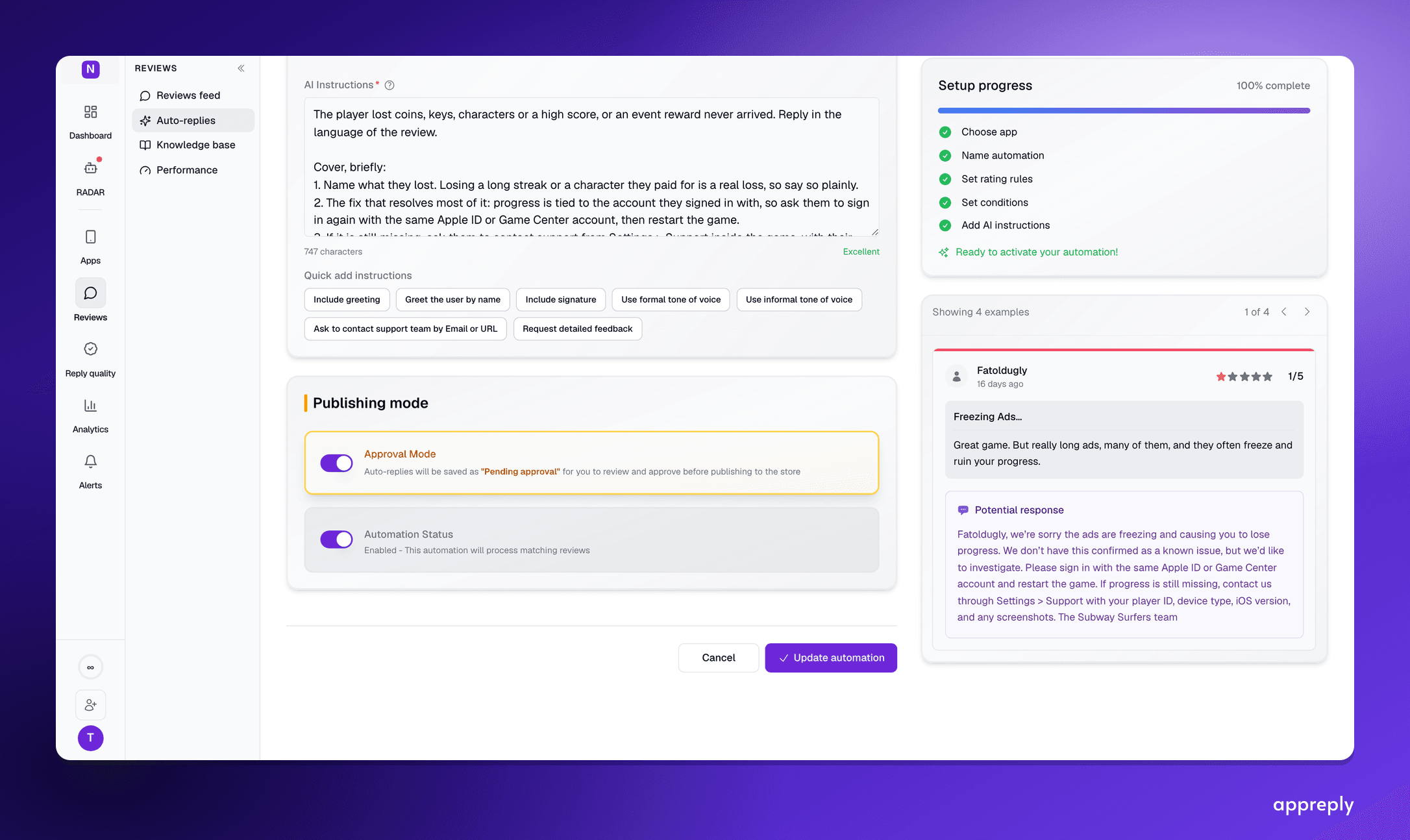
How AI replies to App Store reviews work on iOS: Apple's rules, which replies to publish automatically and which should wait for approval, and what to ask an AI agent about your iOS reviews.
