
Answer app reviews from Freshdesk tickets.
AppReply emails each review you choose to your Freshdesk support address, and Freshdesk opens a ticket. Your agent presses Reply, and AppReply posts the answer to the App Store, Google Play or Galaxy Store.
Works on every plan · No credit card

Trusted by teams behind apps with 1.7B+ combined downloads








Only the reviews that need an agent become Freshdesk tickets.
A ticket rule emails bug reports to your Freshdesk support address, and each one opens a ticket with the reviewer as the requester. Praise stays in AppReply.
 App StoreiOS★★★★★Checkout spins forever.
 Google PlayAndroid★★★★★Signs me out every morning.
 Galaxy StoreAndroid★★★★★Widget shows yesterday.
Bugs to Freshdesk
- If
- 2 stars or fewerEnglishAppReply Browser
- Then
- Create a Freshdesk ticket
 Freshdesk
- OpenApp Review: ★ 1/5 · AppReply Browser#1042 · App Store · iOS
- PendingApp Review: ★★ 2/5 · AppReply Browser#1043 · Google Play · Android
- ResolvedApp Review: ★ 1/5 · AppReply Browser#1044 · Galaxy Store · Android
Replies from the ticket are posted to the store
Copy one address from Freshdesk. Accept once.
Copy your support email
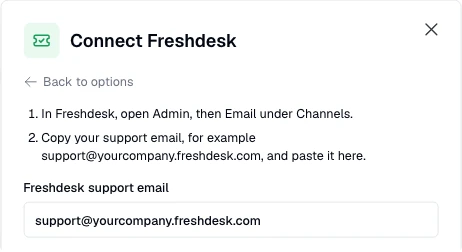
In Freshdesk, open Admin, then Email under Channels. Copy your support address, for example support@yourcompany.freshdesk.com.
Paste it in AppReply
Open Integrations, click Connect under Helpdesk connections and choose Freshdesk. Paste the address into Freshdesk support email and click Send confirmation.
Accept in Freshdesk
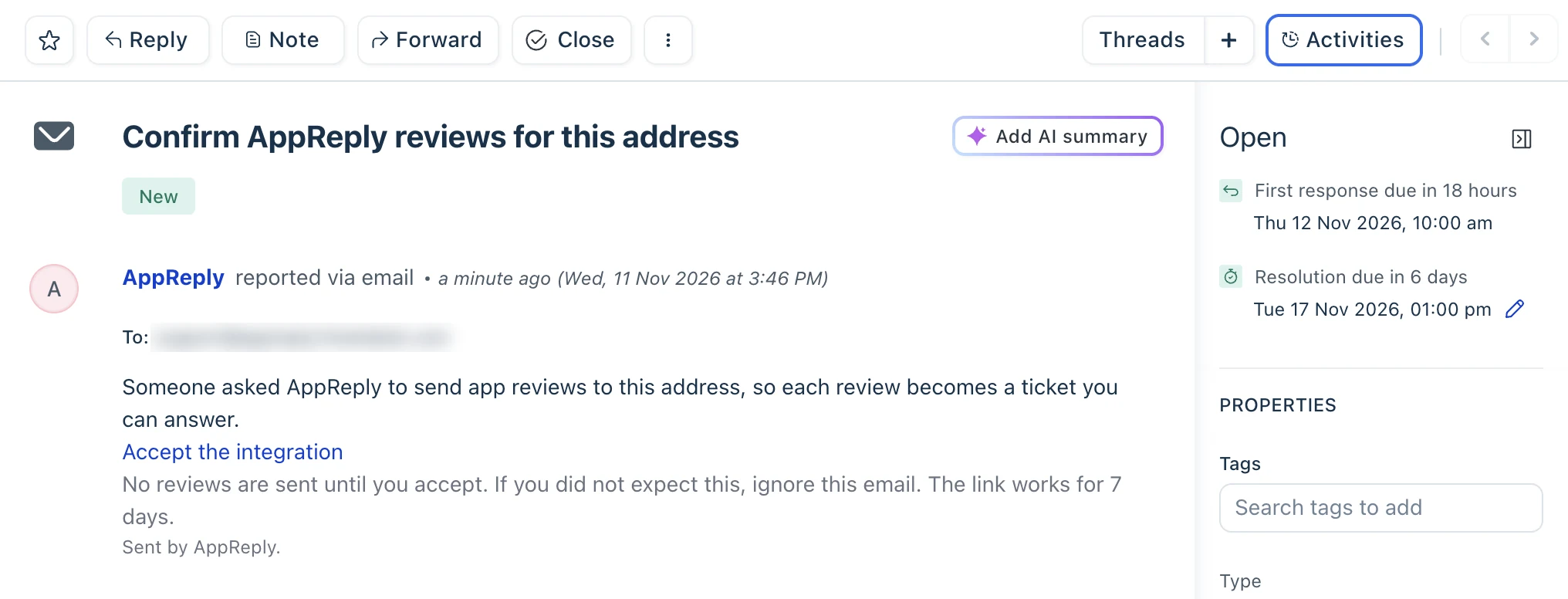
Open the ticket Confirm AppReply reviews for this address, click Accept the integration, then press Accept.
Send reviews over
Use Create ticket on a review. On Pro, add a ticket rule for the reviews that match.
Nothing to install in Freshdesk.
No API key and no app in your Freshdesk account. AppReply needs the support address and nothing else, and it reads only the replies to its own review emails.
Nothing reaches Freshdesk until someone there accepts.
Paste the address and AppReply sends one email first. It opens a ticket called Confirm AppReply reviews for this address, and whoever opens it clicks Accept the integration and presses Accept. No review is sent before that, and the link works for 7 days. Then choose Create ticket on any review, or on Pro let a ticket rule send reviews by stars, app, language, keywords or length.
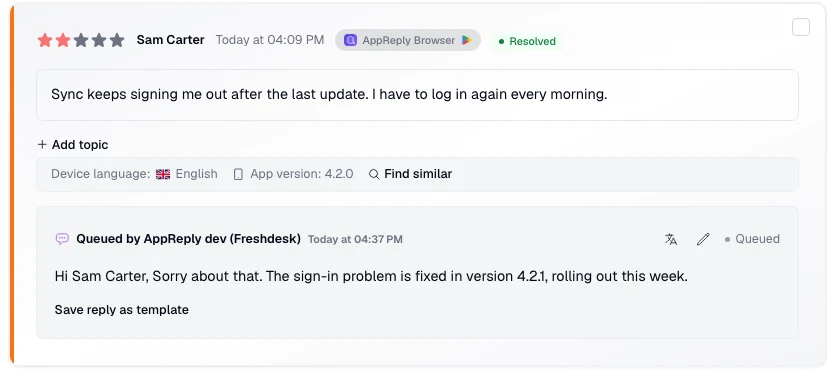
Your agent replies in Freshdesk. The reviewer sees it in the store.
The agent presses Reply, not Add note, and writes the answer. AppReply posts it as your reply and shows it on the review with the agent named as the responder. Freshdesk starts every reply with Hi and the reviewer’s name. That line is posted too and counts toward the store’s limit, 350 characters on Google Play, so agents can edit it or delete it.
Questions about Freshdesk
Do I need a Freshdesk API key?
No. AppReply works with Freshdesk by email. It needs your support address and one accepted confirmation, nothing else.
Can App Store and Google Play reviews become Freshdesk tickets?
Yes, and so can reviews from Galaxy Store, AppGallery and RuStore. A reply to an AppGallery or RuStore review is not posted by email, because those stores do not allow changing a reply: the ticket says to answer it in AppReply. The ticket’s requester is the reviewer’s name. A review with no name shows as Google Play user, App Store user and so on.
Why does the reply start with Hi and the reviewer’s name?
Freshdesk adds that line to every agent reply. It is posted with the reply and counts toward the store’s limit, so agents edit it or delete it before they send.
What if a reply cannot be posted?
A note from AppReply lands on the same ticket. It starts with AppReply did not post your reply and gives the reason, for example that the reply is longer than Google Play allows. Freshdesk shows it as an automated response from the reviewer. The agent presses Reply again with the corrected text, and that reply is posted.
Will Freshdesk’s own emails be posted?
Not the Ticket Received acknowledgement Freshdesk sends for new tickets: AppReply ignores it, and an automation under Admin, Workflows that uses Skip new ticket email notifications stops it for these tickets. Switch off other automatic emails for them, such as solved notices and surveys, because anything sent back above the review can be posted. A reply within two minutes of the review email is not posted: the agent gets a note and can send it again.
Is the agent’s signature posted?
Freshdesk adds no signature by default. If your account adds one, remove it before sending: everything above the review email is posted, unless it follows a line with only -- on it.
Does the ticket status show in AppReply?
No. AppReply does not read or change Freshdesk tickets. In AppReply, the review’s ticket shows as resolved once a reply from Freshdesk is queued.
What happens when a reviewer edits the review?
AppReply emails the edited review again, with [UPD] at the start of the subject. Replying again from the ticket replaces the earlier reply.
Which plan includes the Freshdesk integration?
Any plan can connect Freshdesk and send reviews with Create ticket. Ticket rules need Pro: try them with the 10-day Pro trial. Replies posted from Freshdesk count toward your plan’s replies, like replies written in AppReply.
Other integrations
- Help ScoutConversations by email, answered in Help Scout
- FrontReviews in a Front shared inbox
- ZendeskTickets made from reviews
- Any helpdesk by emailAny helpdesk or shared inbox that takes email
- All integrationsChat apps, webhooks, helpdesks and AI agents
- Supported storesFive app stores in one review inbox


Answer your next hard review from Freshdesk.
Paste your support address, accept the confirmation, and let your agents reply from the ticket.
Works on every plan · No credit card