
Reply to app reviews from Help Scout.
Each review you pick lands in your Help Scout inbox as a conversation. An agent answers it there, and AppReply posts the answer as your reply on the App Store, Google Play or Galaxy Store.
Works on every plan · No credit card

Trusted by teams behind apps with 1.7B+ combined downloads








Hand Help Scout the reviews that need a person.
A ticket rule emails bug reports to your inbox address. Help Scout opens a conversation for each one, and every reviewer arrives as a customer of their own. Reviews that need no help stay in AppReply.
 App StoreiOS★★★★★Search ignores my filters.
 Google PlayAndroid★★★★★Crashes when I open a tab.
 Galaxy StoreAndroid★★★★★Sound cuts out in calls.
Bugs to Help Scout
- If
- 2 stars or fewerEnglishAppReply Browser
- Then
- Create a Help Scout conversation
 Help Scout
- ActiveApp Review: ★★ 2/5 · AppReply Browser#2210 · App Store · iOS
- PendingApp Review: ★ 1/5 · AppReply Browser#2211 · Google Play · Android
- ClosedApp Review: ★★ 2/5 · AppReply Browser#2212 · Galaxy Store · Android
Replies from the conversation go to the store
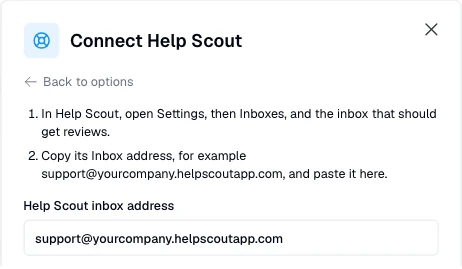
Paste your inbox address. Accept once.
Copy the inbox address
In Help Scout, open Settings, then Inboxes, pick the inbox and choose Edit Inbox. Copy its Inbox address, for example support@yourcompany.helpscoutapp.com.
Connect in AppReply
Under Helpdesk connections on the Integrations page, click Connect and choose Help Scout. Paste the address into Help Scout inbox address, then click Send confirmation.
Accept the conversation
A conversation called Confirm AppReply reviews for this address arrives. Click Accept the integration, then Accept.
Start sending reviews
Use Create ticket on a review, or on Pro add a ticket rule for the ones that match.
Nothing to install in Help Scout.
No API key, app or OAuth. AppReply sends reviews to the inbox address you accepted and reads only the replies to its own review emails.
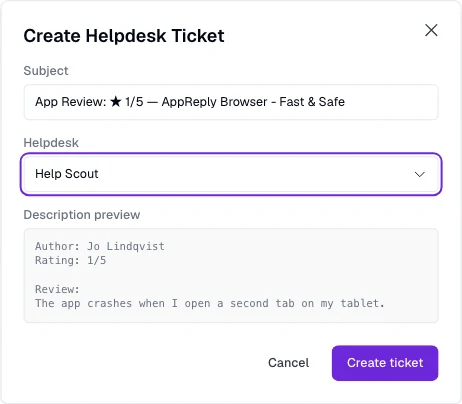
Send a review over by hand, or let a rule do it.
Choose Create ticket on any review and pick Help Scout. The email carries the stars, app and store, the review and its translation, the author, date, app version, country and language, and a link back to the review. On Pro, a ticket rule sends the new reviews that match, by stars, app, language, keywords or length.
Your agent writes the reply. AppReply leaves out the extras.
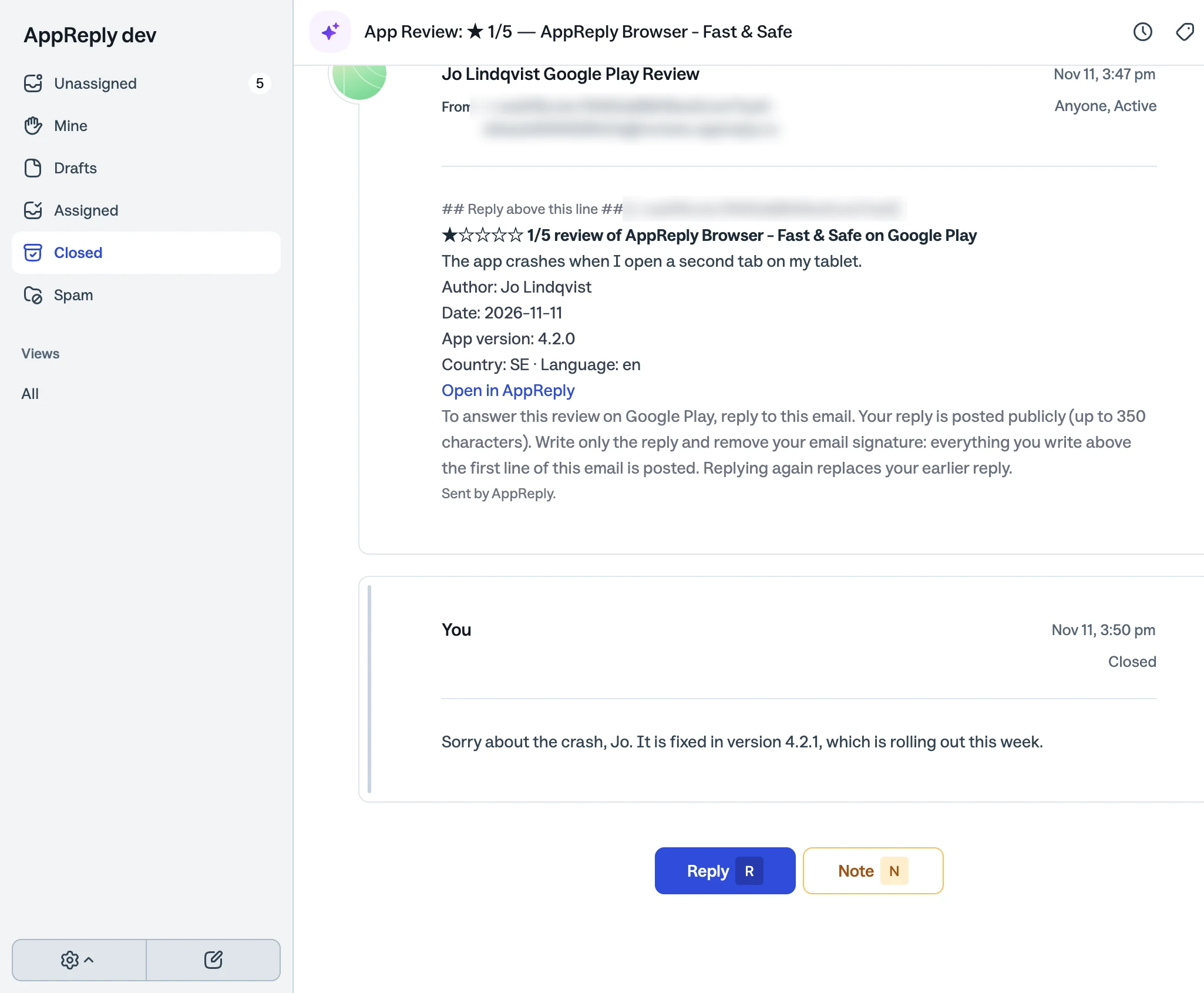
The agent replies in the conversation as usual. AppReply posts only what they wrote: the inbox signature and the How would you rate my reply? line Help Scout adds stay out. If the conversation closes when the reply is sent, nothing changes for AppReply. The review in AppReply shows the reply with the agent’s name and (Help Scout).
Questions about Help Scout
Do I need a Help Scout API key or app?
No. Help Scout gets reviews by email, and agents answer by email from the conversation. AppReply needs only the inbox address.
How does a review look in Help Scout?
As a new conversation from a customer named after the reviewer and the store, such as Jo Lindqvist Google Play Review. Every review comes from its own address, so each reviewer is a separate customer.
Is the inbox signature posted to the store?
No. AppReply leaves out the Help Scout signature and the rating prompt. Anything else the agent writes above the review email is posted.
Should auto reply be off?
Yes. New Help Scout accounts start with auto reply off. If yours is on, switch it off for these conversations. A reply that arrives within two minutes of the review email is not posted: the agent gets a note and can send it again.
What if a reply is too long or cannot be posted?
A note from AppReply arrives in the same conversation as a new customer message, reopens it and says why, for example that Google Play allows up to 350 characters. The agent replies again there with a shorter answer.
Can an agent change a reply later?
Yes. Replying again in the conversation replaces the earlier reply on the store. Huawei AppGallery and RuStore do not allow changing a reply, so replies to their reviews are not taken by email: answer those in AppReply.
Does the conversation status show in AppReply?
No. AppReply does not read or change Help Scout conversations. The review shows the reply, and its ticket in AppReply is marked resolved once the reply is queued.
Which plan includes Help Scout?
Every plan can connect Help Scout and use Create ticket. Ticket rules need Pro, which the 10-day trial includes. Each posted reply counts toward the plan’s replies.
Other integrations
- FreshdeskTickets by email, answered from the ticket
- FrontReviews in a Front shared inbox
- IntercomConversations made from reviews
- Any helpdesk by emailAny helpdesk or shared inbox that takes email
- All integrationsChat apps, webhooks, helpdesks and AI agents
- Supported storesFive app stores in one review inbox


Answer your next hard review from Help Scout.
Connect your inbox, accept the confirmation, and reply from the conversation.
Works on every plan · No credit card